Courtyards at Southpoint
Tech Tips
How to Use Slack More Effectively
By Karen Frankola
This month, we’re taking a look at two technology tips to improve your user experience in Slack, our neighborhood’s preferred social network.
Tip 1: Reply to a Slack post in thread
In a recent month, nearly 700 messages were posted in our Slack community! A great way to make Slack easier to use is to reply to a message/post in a thread, rather than create a new message below the previous one.
When you don’t use the reply feature and create a new post, Slack automatically indicates that you have started a new subject and makes locating responses and receiving notifications more difficult.
For example, everyone who responded to this request replied, instead of creating a new post, so all the responses show up as a thread that can be expanded or ignored. Much cleaner for everyone!

If your reply is so important you want everyone to see it immediately instead of clicking on the responses —such as a safety issue — check the box “Also send to (whatever channel you’re in).” Your response will appear as a new post, as well as a reply in the thread.
To reply on a phone or tablet:
-
Touch the message/post you want to reply to or the “X replies” link. The original post and previous responses will appear, with a blank box at bottom to “Add a reply.”

Tip 2: Sending messages to one person or a small group
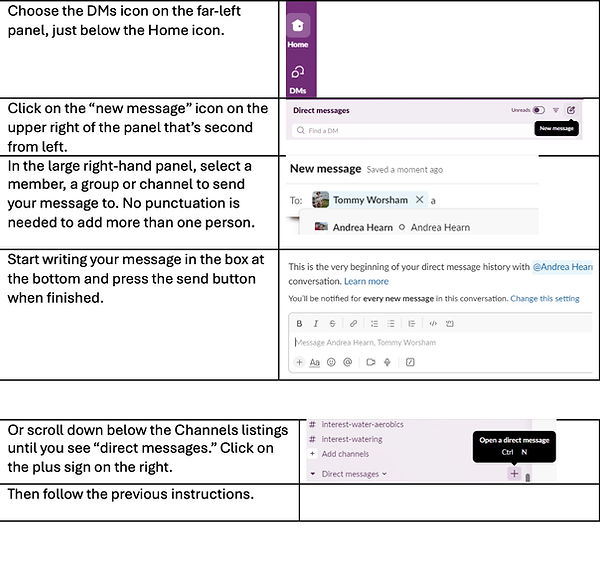
Roughly 80% of our Slack messages are posted publicly in channels, while just 20% are sent via direct messages, known as DMs. DMs are a great way to communicate with one person or for posts of specific interest. Say, your next-door neighbors.
Responses will appear in bold under “direct messages,” and your conversation will appear as a thread. The process is almost identical on a tablet, except you’ll touch rather than click. On a PC:
Direct messaging on a phone…
-
Touch the DMs icon on the bottom of your screen.
-
Touch the “new message” icon.
-
Add a member or group and begin typing or dictating your message.
Do you have questions about how to use Slack? If so, send them to Karen. Or let us know if you’re interested in attending a workshop at the clubhouse.