Courtyards at Southpoint
Tech Tips
How Do I Find/Ask for Help
By Karen Frankola
Need a plumber? A doctor? Someone to help you move something heavy? We live in an amazingly helpful neighborhood, so here are the best ways to get help.
If you need a service provider, check the list first:
-
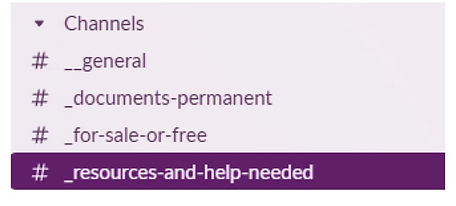
Go the _document-permanent channel of Slack
2. Click on Service Provider Reference List — or bookmark this URL in a browser without going to Slack first.
3. Please don’t just refer to this list. Add to it whenever you find someone you’d like to recommend.
4. If you don’t find what you’re looking for, take the steps below.
If you need help from a neighbor, or the list doesn’t have what you need:
Want to borrow a crockpot or a bike? Can’t remember what color your house paint is? Need help installing a keypad door lock? Courtyard neighbors can help with almost anything!
-
Go to the _resources-and-help-needed channel of Slack.
Post your question.
Please post answers as “replies,” as shown in the example above instead of answering with a new post. This way answers will all appear grouped as a thread.
Other notes: If you need a ride to a medical appointment and/or someone to stay with you, use the: Medical Appointment Assistance list, which is also in the _documents-Permanent channel.
To reply to a post instead of creating a new post, please choose “Reply in Thread”.
You can search all of Slack or within a channel but because our posts don’t stick around too long, we rely on the Service Provider Reference list, which is a Google Document. However, if you want to search in a Channel, use the Global Search Bar on top and type in keywords followed by in:#channel name